Controls
- W Move up
- A Move left
- S Move down
- D Move right
- J Attack / Interact / Menu Confirm
- K Use skill / Menu Cancel
- L Use item
- R RAGE OUT (if you have a certain skill and all four letters)
- 1—9 Hotkeys
- SPACE Open game menu / Pause
10 Second Tutorial
- Defeat all the
 monsters in a room to advance.
 - Collect
 coins to purchase items in shops.
 - Collect
 stars to upgrade your skills in the main menu.
 - Interact with
 characters to obtain hints and quests.
 - Interact with
 fountains to set checkpoints (where you will respawn when dead).
 - Don't die.
Setting Hotkeys
Hotkeys are used to quickly equip items. There are nine configurable hotkeys available (keyboard keys 1—9) which are set the following ways:
- When you pick up a consumable item that you've never picked up before, a hotkey is automatically set if one is available.
- In the Skill or Inventory menus, pressing a hotkey while selecting a valid item assigns that item to the hotkey.
Assigned hotkeys appear at the bottom of the play area, next to your equipped items.
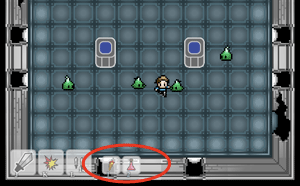
These can be assigned hotkeys:
- Consumable items such as potions and torches.
- Weapons, armor, and relics.
- Skills.
Remember: Pressing a hotkey merely equips the item. If the item you equipped is a consumable item or skill, you'll still need to use the corresponding action key (K for skill usage, L for item usage).
Protips
- You always face the last directional key pressed. This is important when moving diagonal.
- While in RAGE mode, treasure chests do not require keys to open. Simply rage right through them.
- You can grab out of reach items by slashing at them.